Workflow data and expressions
Step parameters can use values produced by earlier steps. Expressions are evaluated when the step runs, after its upstream dependencies have completed.
Reference another step
Use the step's name, not its id:
const persist = new Step({
  name: 'Persist Reply',
  type: 'core.set',
  params: {
    values: {
      reply: "={{ $('Support Agent').json.response }}",
    },
  },
});
The default port is main and the default item index is 0. The expression above is equivalent
to selecting the first item from the Support Agent's main output.
When the entire parameter is an expression, the resolved value keeps its original type. An object stays an object, an array stays an array, and a number stays a number.
params: {
  values: {
    // number
    total: "={{ $('Calculate Total').json.total }}",

    // complete object
    customer: "={{ $('Load Customer').json }}",
  },
}
Use an inline expression to interpolate a value into text. Inline expressions always produce a string:
params: {
  values: {
    message: "Agent reply: {{ $('Support Agent').json.response }}",
  },
}
Nested objects and arrays
Use dot or bracket notation for nested JSON:
params: {
  values: {
    firstEmail: "={{ $('Load Customers').json.customers[0].email }}",
    secondTag: "={{ $('Load Customers').json.customers[0].tags[1] }}",
    status: "={{ $('HTTP Request').json['status-message'] }}",
  },
}
There are two different array indexes to keep separate:
$('Search')[2]selects item2emitted by the Search step..json.results[2]selects element2inside the selected item's JSON.
params: {
  values: {
    // Third emitted item, then the first nested result inside that item's JSON.
    id: "={{ $('Search')[2].json.results[0].id }}",
  },
}
Output indexes
Every node has one port, main. What varies per node type is how many output indexes that
port has, and that's what determines how many other nodes it can connect to. A node with one
output index can only wire to one thing at a time; a node with several can wire a different
downstream step to each index.
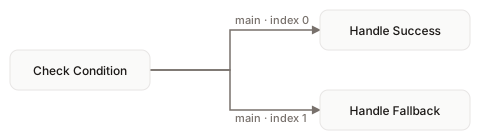
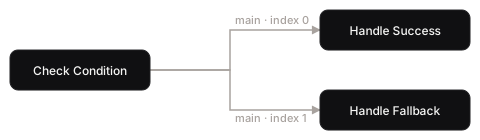
The If node always has exactly two output indexes, 0 (true) and 1
(false), so it connects to at most two downstream steps, one per branch. Merge and Switch node
types generalize this the same way, with more output indexes on the same main port.
An output index is selected when steps are connected, not inside an expression. For an If step,
output index 0 is one branch and output index 1 is the other:
checkCondition.connectTo(handleSuccess, {
  fromPort: 'main',
  fromOutputIndex: 0,
});

checkCondition.connectTo(handleFallback, {
  fromPort: 'main',
  fromOutputIndex: 1,
});
Converging connections
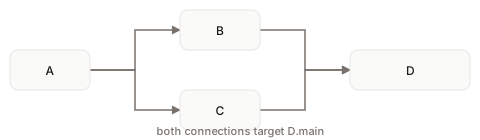
Fan-out isn't the only shape. Multiple steps can also connect into the same target's main input.
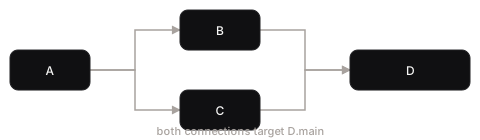
A connects to both B and C, and B and C each connect onward into the same step D:
a.connectTo(b);
a.connectTo(c);
b.connectTo(d);
c.connectTo(d);
D is ready to run as soon as its main port has anything on it. Both connections target that same port, so whichever of B or C delivers first is enough to trigger D. It doesn't wait for the other.
That's different from a node with more than one distinct input port. When a node declares two separately-named input ports rather than two connections into the same port, it won't run until every one of those ports has data. Readiness is checked per port name, not per incoming connection.
The downstream step receives only the branch connected to it. It references that delivered data normally:
"={{ $('Check Condition').json.reason }}"
Runtime metadata
Workflow parameter expressions can also read execution metadata:
params: {
  values: {
    executionId: '={{ $system.execId }}',
    workflowId: '={{ $system.workflowId }}',
    currentNodeId: '={{ $system.node.id }}',
  },
}
$system is a workflow-expression root. It is not a surface data-binding root.
Expression reference
| Need | Expression |
|---|---|
First item on main | ={{ $('Node').json.value }} |
| Whole JSON object | ={{ $('Node').json }} |
| Emitted item at index 2 | ={{ $('Node')[2].json.value }} |
| Nested object | ={{ $('Node').json.customer.id }} |
| Nested array | ={{ $('Node').json.items[0].id }} |
| Key containing punctuation | ={{ $('Node').json['status-message'] }} |
| Inline text | Value: {{ $('Node').json.value }} |
Only previously executed nodes in the current lineage are available. Keep step names unique so a reference always identifies one producer.