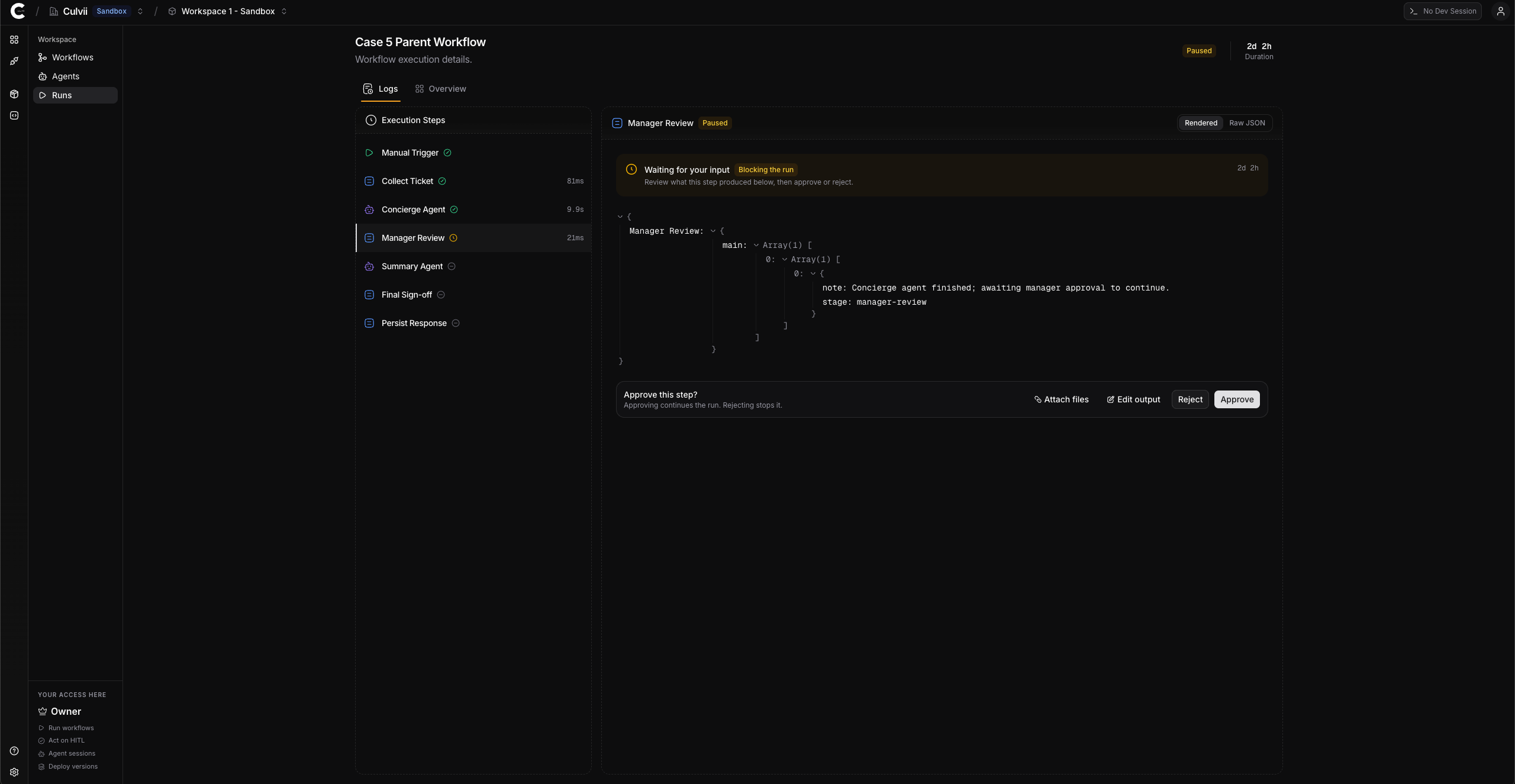
Human in the loop
Some agent decisions should never be made without a human in the room. Culvii's primitive for this is gate().
The gate() primitive
gate() is a step in a workflow. When the engine reaches a gate, it pauses the run and emits an approval request to the operator's Inbox in the Console. Execution resumes only after the gate is approved (or rejected, in which case the workflow takes the rejection branch).
gate('approve-contract', {
condition: (state) => state.contractValue > 100_000,
message: (state) =>
`Contract value $${state.contractValue.toLocaleString()} ` +
`exceeds $100k threshold. Approve to proceed.`,
onApprove: (state) => ({ ...state, approval: 'granted' }),
onReject: (state) => ({ ...state, approval: 'denied' }),
})
A few properties to internalize:
- Pause is durable. The engine persists run state. A gate can wait thirty seconds or thirty days. Servers can restart. The pause survives.
- Pause is binary. The workflow doesn't poll; the engine resumes the run when the operator acts.
- Conditional gates skip cleanly. If
conditionreturnsfalse, the gate doesn't fire. The workflow continues without pausing.
HITL vs. HOTL
Two distinct patterns:
| Pattern | What it is | Where it shows up |
|---|---|---|
| Human in the loop (HITL) | Mandatory checkpoint. The workflow cannot continue without explicit approval. | gate() — the workflow primitive |
| Human on the loop (HOTL) | Exception-based supervision. The workflow runs autonomously; humans intervene when something looks off. | Operator dashboards, alerts, manual run cancellation |
These are complementary, not substitutes. HITL is for steps where the consequence is irreversible or high-stakes (sending money, sending email to customers, deleting data). HOTL is for the rest — runs you want to know about but don't want to slow down.
In Culvii v1: HITL via gate() is in the SDK and the Inbox; HOTL via the Console (run inspection, manual cancel, audit log review) is in the Console. Programmatic HOTL hooks (e.g., webhooks fired on policy violations) are on the roadmap.
When to use HITL
Reach for gate() when:
- The action is irreversible (paying a vendor, deleting records, publishing content).
- The action is high-stakes (financial threshold, legal commitment, customer-facing decision).
- The agent's confidence is low (the workflow can inspect the agent's output and route to a gate when confidence is below a threshold — see Pattern 1 below).
- Compliance requires human sign-off (regulatory environments, audit-heavy industries).
Don't reach for gate() when:
- The action is reversible and low-cost (drafting an email; generating a summary).
- The check could be automated (a deterministic rule is enough; a guard or branch suffices).
- Approval would create a bottleneck the team can't sustain.
The shape of the question is "would I want to say no to this after it happened?" If yes, gate it.
Patterns
Pattern 1 — confidence-gated approval
Let the agent assess its own confidence; gate when confidence is low.
step('analyze', { agent: riskAnalyst, output: 'assessment' }),
gate('low-confidence-review', {
condition: (s) =>
s.assessment.recommendation !== 'GO' || s.assessment.confidence < 0.7,
message: (s) =>
`Recommendation: ${s.assessment.recommendation} ` +
`at ${Math.round(s.assessment.confidence * 100)}% confidence. Review?`,
}),
The agent runs autonomously when it's sure. A human reviews when it isn't.
Pattern 2 — threshold gate
Gate when a numeric threshold is crossed.
gate('high-value-approval', {
condition: (s) => s.contractValue > 100_000,
message: (s) => `Contract value $${s.contractValue} requires approval.`,
}),
Pattern 3 — always gate (the safe default)
Some actions should always be human-approved.
gate('publish-approval', {
condition: () => true,
message: (s) => `Approve before publishing to ${s.audience}?`,
}),
This is the right default for early production usage. Loosen the condition over time as you build confidence.
The operator's view
When a workflow hits a gate, the operator sees a card in their Inbox in the Console. The card includes:
- The workflow name, version, and run ID.
- The gate's
messagetext. - The relevant state at the moment the gate fired.
- Approve / Reject buttons.
Approval is logged in the audit trail with the operator's identity, timestamp, and the gate's correlation ID linking to the run.
See Operator's Guide → Approving HITL gates.
What's not in v1
- Multi-approver gates (e.g., "any two of these three operators must approve"). On the roadmap.
- Programmatic webhook gates (a gate that fires a webhook to an external approval system). On the roadmap.
- SLA timers on gates (auto-escalation if not approved in N hours). On the roadmap.
For v1, every gate is a single-operator approval, available to anyone in the relevant workspace with appropriate permissions.