Architecture overview
Culvii is a cloud product with a developer-facing SDK and CLI. Your code describes what a workflow should do; Culvii's cloud runs it. There's no local engine and nothing to containerize.
The four components
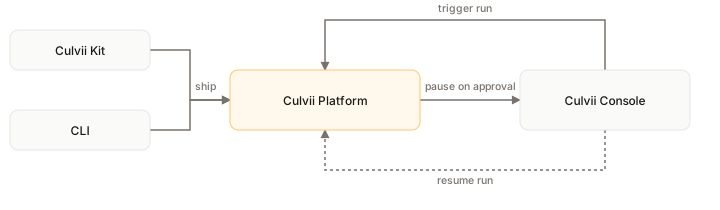
Culvii Kit (@culvii/kit) is a TypeScript SDK. You write Workflow, Step, and MultiAgentEngine objects that describe a graph. Kit never executes anything. It serializes what you built to JSON.
Culvii CLI (culvii) ships that JSON to the platform. culvii dev watches your files, re-serializes on save, and syncs each change to a live dev session you can watch run in the Console. culvii deploy does the same serialization but writes an immutable, versioned snapshot instead of a live-synced draft.
Culvii Platform is the backend that runs what you shipped. It receives triggers, executes the workflow graph step by step, and hands agent steps off to run the model's tool-calling loop, resolving provider credentials at call time, never from anything baked into your definition.
Culvii Console (console.culvii.com) is where people watch runs, approve or reject paused steps in the Inbox, manually trigger a workflow or agent, review the audit log, and manage workspaces and keys. A manual trigger from the Console calls back into the Platform the same way a cron schedule or webhook does.
Configuration vs. execution: the mental shift
The SDK is a configuration DSL, not a runtime. The code you write in Kit isn't the program that runs your workflow. It's a typed description of what the workflow is. The platform runs it, the same way Pulumi or the AWS CDK synthesize an artifact that the cloud executes, not your laptop.
Two consequences:
- Your step and agent logic runs in Culvii's cloud, not on your machine or in your data center.
- There's no local execution mode. Even
culvii devis a live sync to a cloud dev session, not a local engine.
This is deliberate. It's what makes the audit trail complete. If execution could happen anywhere, there'd be gaps in it.
How a run actually moves
- A trigger fires (a manual run, a cron schedule, or a webhook, each armed from the Console when you activate a version) and reaches the platform.
- The platform steps through the graph, running each node (an HTTP call, a code step, a branch) in turn.
- When it reaches an agent step, the platform runs that agent's tool-calling loop against the model, resolving its credentials at call time.
- If a step has a
waitSurface attached, the run pauses and shows up in the Console's Inbox. Someone approves or rejects it there, and the platform continues from where it left off. - All of this, state, audit events, traces, lives on the platform, not your machine.
Reaching data inside your network
Since step and tool logic runs on Culvii, not on your infrastructure, a tool that needs private data has to be reachable from Culvii, not the other way around.
| Approach | Use when |
|---|---|
| HTTPS endpoint | You already have (or can deploy) an internal API behind authentication. An HTTP step calls it directly. |
| MCP server | The system already speaks MCP: Jira, Notion, GitHub, your own server. Connect it once and grant it to an agent. |
| Managed connector (roadmap) | A pre-built connector with auth and schema handled by Culvii. Not shipped. |
| Smart Client Worker (roadmap) | Tool code runs inside your network on a process you host, with Culvii calling back over a persistent channel. Not shipped. |
If your data sits behind a firewall with no inbound path today, you need an HTTPS interface in front of it.
What's not shipped
Local execution, the Smart Client Worker, self-hosted or single-tenant Culvii, and a custom Console domain (you're at console.culvii.com, not your own domain). All of this is on the roadmap.